Pear Deck
6
Product Details
- Website
- https://www.peardeck.com/
- Overview
-
Pear Deck is an interactive lesson-delivery add-on for Google Slides and Microsoft PowerPoint. It is designed primarily for K–12 learners participating in teacher-led or student-paced interactive presentations, with classroom teachers, students, instructional coaches, and administrators using it to support active participation, checks for understanding, discussion, and formative assessment.
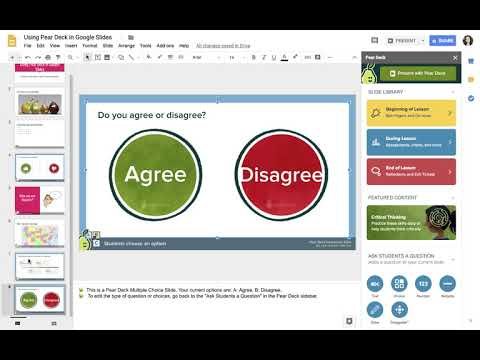
Teachers embed questions, drawing, draggable responses, polls, and prompts into presentations and view student responses during or after instruction. The product should be evaluated for the specific learners, instructional setting, and intensity of support a district intends—not simply as another source of digital activities.
- Student Data Privacy
-
Review the Common Sense Privacy Rating:
https://privacy.commonsense.org/evaluation/pear-deckPear Deck Privacy Policy:
https://github.com/peardeck/policies/blob/main/privacy-policy.md
Signed California Student Data Privacy Agreement?
No - Features
-
Audience and instructional role
- Grades / learners: K–12 learners participating in teacher-led or student-paced interactive presentations
- Primary users: classroom teachers, students, instructional coaches, and administrators
- Learning focus: active participation, checks for understanding, discussion, and formative assessment — an interactive lesson-delivery add-on for Google Slides and Microsoft PowerPoint
How it supports learning- Teachers embed questions, drawing, draggable responses, polls, and prompts into presentations and view student responses during or after instruction.
- Teachers should use the product within a defined instructional model rather than treat activity completion as evidence of learning.
Implementation and instructional decisions- Pear Deck improves visibility into participation but does not supply a coherent curriculum by itself; teachers must design accessible, instructionally meaningful prompts and respond to evidence.
- Districts should confirm accessibility, language support, student-data practices, assignment workflow, reporting, and the role of teacher judgment.
- Support Options
-
- Email •
- Phone •
- Web
- Company News
The fastest way to transform presentations into classroom conversations.
Imagine if you could engage every student in your class, every day. What if you could instantly see who’s confused and who’s ready for more? That’s the power of Pear Deck. And now, with the Pear Deck for Google Slides Add-on, you can add the magic of formative assessments and interactive questions to your presentations right from Google Slides.
The fastest way to transform presentations into classroom conversations.
Imagine if you could engage every student in your class, every day. What if you could instantly see who’s confused and who’s ready for more? That’s the power of Pear Deck. And now, with the Pear Deck for Google Slides Add-on, you can add the magic of formative assessments and interactive questions to your presentations right from Google Slides.
Videos